Year:
Purdue UX Design Studio Spring 2025
Overview
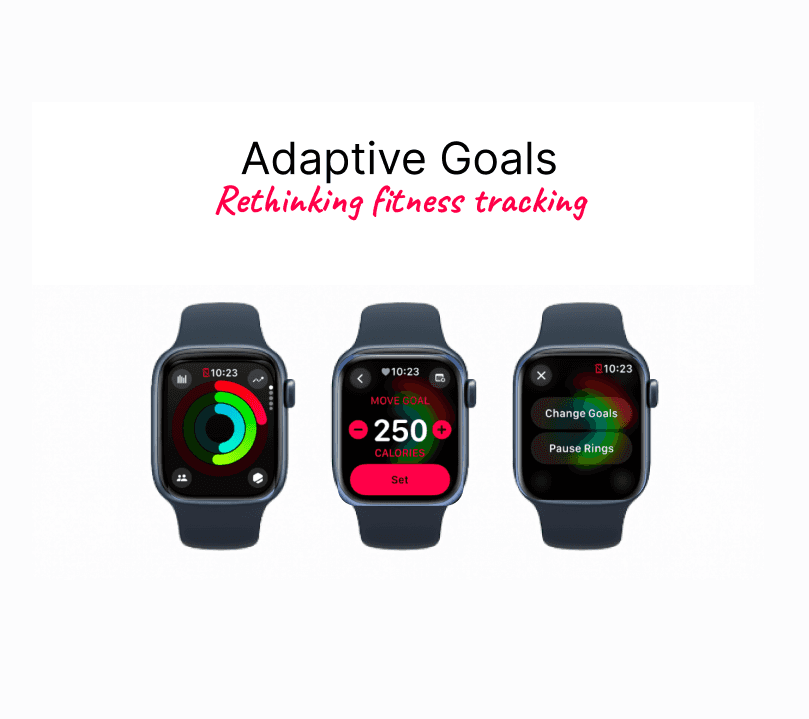
For this project as a part of Purdue's UX Design Studio, our team set out to rethink how fitness trackers support motivation and habit building. We focused on college students using the Apple Watch and found that static goals often led to guilt, stress, or even “cheating the system.” To address this, we designed an adaptive goals feature that adjusts daily activity targets based on how the user feels mentally, physically, and with their schedule. Our solution helps students stay active without the pressure of rigid goals, building healthier long term habits while keeping trust and motivation at the center of the experience. ✨🏃♂️⌚
🎨Click to view - Fig jam
📄Click to view - Documentation Master Copy
Project Stages 🛠️
We explored how fitness trackers influence behavior and motivation. The process included:
Understanding how users interpret body data and set goals.
Interviewing and observing users to uncover habits and frustrations.
Analyzing insights to define the core problem and guide design decisions.
Iteratively designing solutions, starting with low- and mid-fidelity mockups and refining based on feedback.
Team Members 👥
Ani Berry – UX Design & Psychology
Emily Clark – UX Design
Sarah Neumann – UX Design
Priscilla Tam – UX Design & Computer Systems Analysis
Starting with Research 🔍
We began with secondary research to understand people’s behaviors, motivations, and frustrations with fitness trackers. Our main goal was to learn what drives consistent usage and long-term engagement.
Key Research Questions ❓
What motivates people to stay active: internal factors (health, confidence) or external ones (streaks, social features)?
Which body metrics are most important or confusing?
Which goal-setting systems help people stick to routines?
Why do people stop using fitness trackers or try to “game” the system?
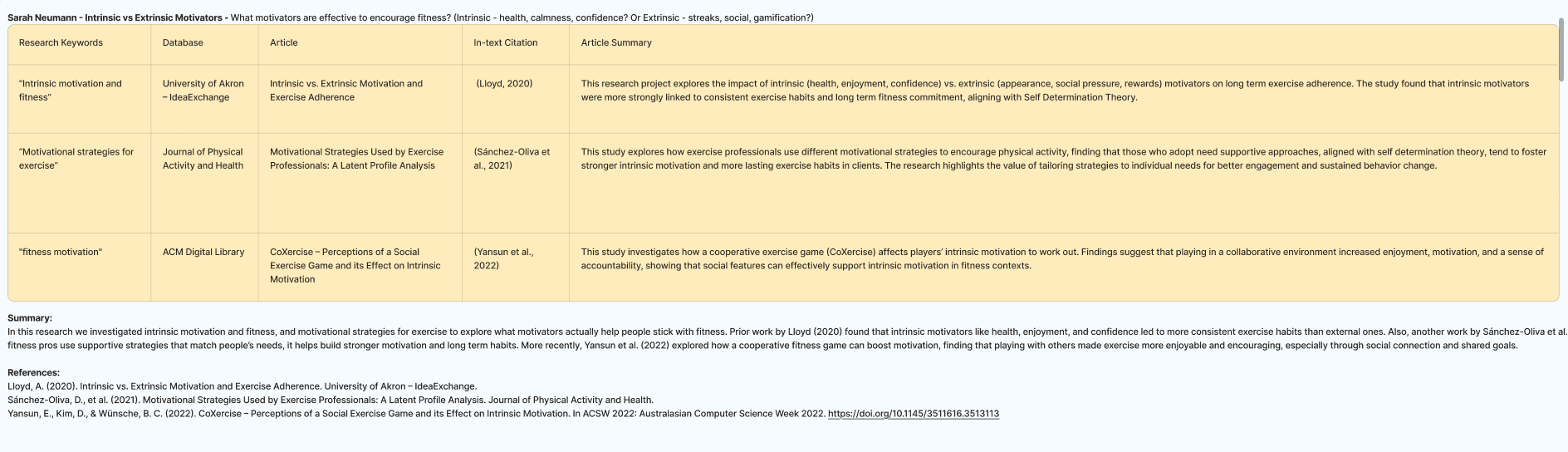
We gathered insights from academic sources and articles, then summarized them on a FigJam board for the team.
What We Found 🔎
Motivation 💪
Intrinsic motivators like wanting to feel healthier, more confident, or simply better—led to more consistent fitness habits than extrinsic ones like rewards or leaderboards. Personalized support and social enjoyment also mattered.
Body Data Tracking 📊
Trust and clarity were big issues. Users doubted the accuracy of steps, calories, and sleep data. When numbers didn’t match their intuition, frustration grew. People valued different metrics at different times, so trackers need to adapt to changing goals.
Mental Models & Goal Setting 🎯
Smaller, realistic goals worked best, especially when they adapted to user progress. Personalized daily step goals increased activity and enjoyment.
Behavior Change 🔄
Reminders, self-tracking, and feedback helped form habits. Competition could backfire—some users felt discouraged or cheated. Balance and flexibility are key.
The Downside of Tracking ⚠️
Over-focusing on numbers caused stress. Social sharing sometimes led to unhealthy comparisons, and partial efforts often felt like failures.
Key Takeaways ✨
Keep users intrinsically motivated
Adapt goals to energy levels and changing needs
Build trust in the data
Reduce guilt and stress with flexible goal support
Exploring the Context 🌐
Mapping It Out with Activity Theory
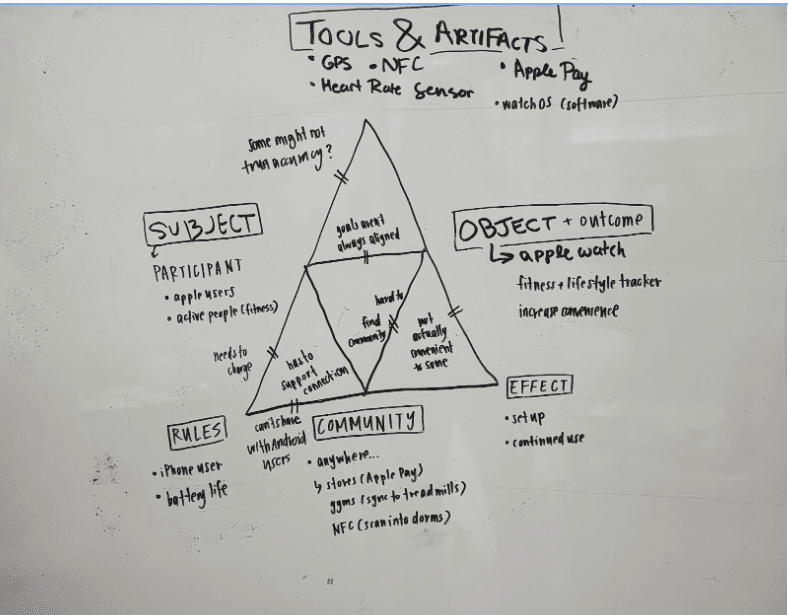
We used an activity theory framework to analyze how the Apple Watch fits into users’ lives, examining the relationships between the user, their tools (watch, app, data), and the outcomes they want to achieve.
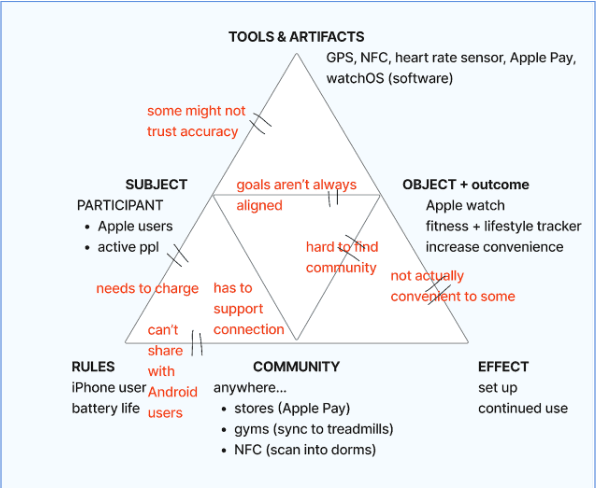
Pain points / What We Noticed❗
Not everyone shares the same fitness goals
The watch isn’t convenient for all users
Some users don’t fully trust the data
It can be hard to find a real sense of community
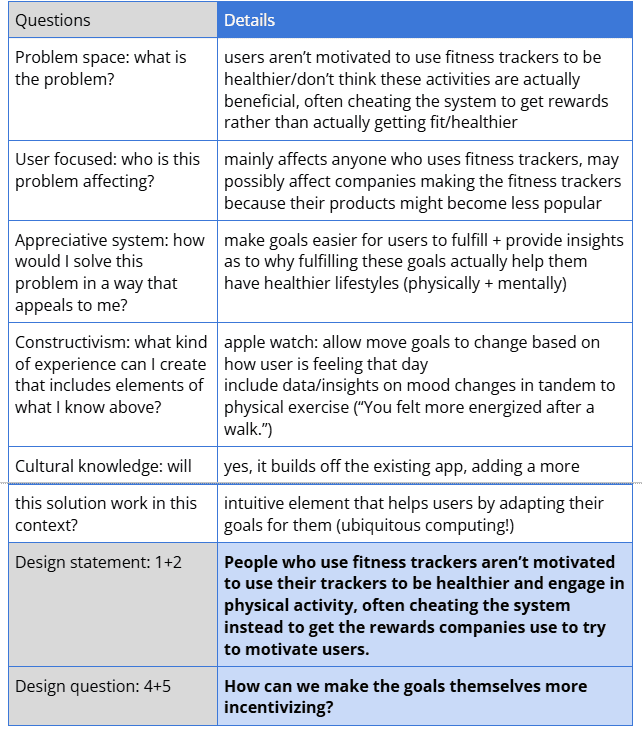
Framing the Problem 📝
Users often focus on closing rings or earning rewards, but these actions don’t always translate to real health improvements. Motivation drops, and some even try to “game” the system.
Design Challenge 💡
How might we make fitness goals more meaningful and motivating so users stick with them for real progress, not just to beat the system?
Early Ideas 💭
With a clear direction, we brainstormed ways to reimagine the fitness tracking experience, focusing on adaptive, supportive, and motivating solutions.
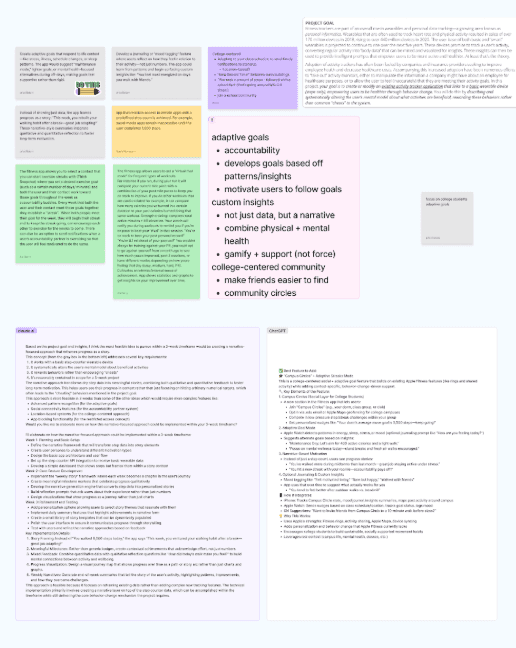
Screenshot of idea board
*Link to FigJam
Concepts We Explored 💡
Lock social media apps until users meet fitness goals
“Rival mode” to compete with past performance
College campus network for group fitness motivation
Goals that adapt based on mood, stress, or energy
AI Recommendations 🤖
Claude: Reframe fitness as a personal story with milestones, reflection, and intrinsic rewards
ChatGPT: Combine social fitness circles with adaptive streaks that adjust based on how users feel
After team discussion and desk critique feedback, we focused on adaptive goals for college students.
Deep Dive: Adaptive Goals 📈
Why Adaptive Goals?
Most apps use static goals that don’t reflect how a user feels or behaves
Research shows adaptive goals improve long-term progress (Adams et al., 2017)
Current apps like MyFitnessPal still lack true personalized adjustments
Knowing Our Users 👥
Key findings from College Student Interviews
Students Use Apple Watches to track steps, workouts, heart rate, and rings
Closing rings motivates, missing a day causes guilt
Busy schedules make consistent activity challenging
Adaptive goals were well received; students liked flexible, personalized targets
Some worry goals could become too lenient
Validating with Secondary Research 📊
Activity levels fluctuate with the school calendar (Bai et al., 2020)
Students more active on weekdays, less on weekends
Exercise strongly linked to mood, mindfulness, and stress relief
Adaptive goals help students match goals to energy levels and schedules
Designing & Iterating ✨
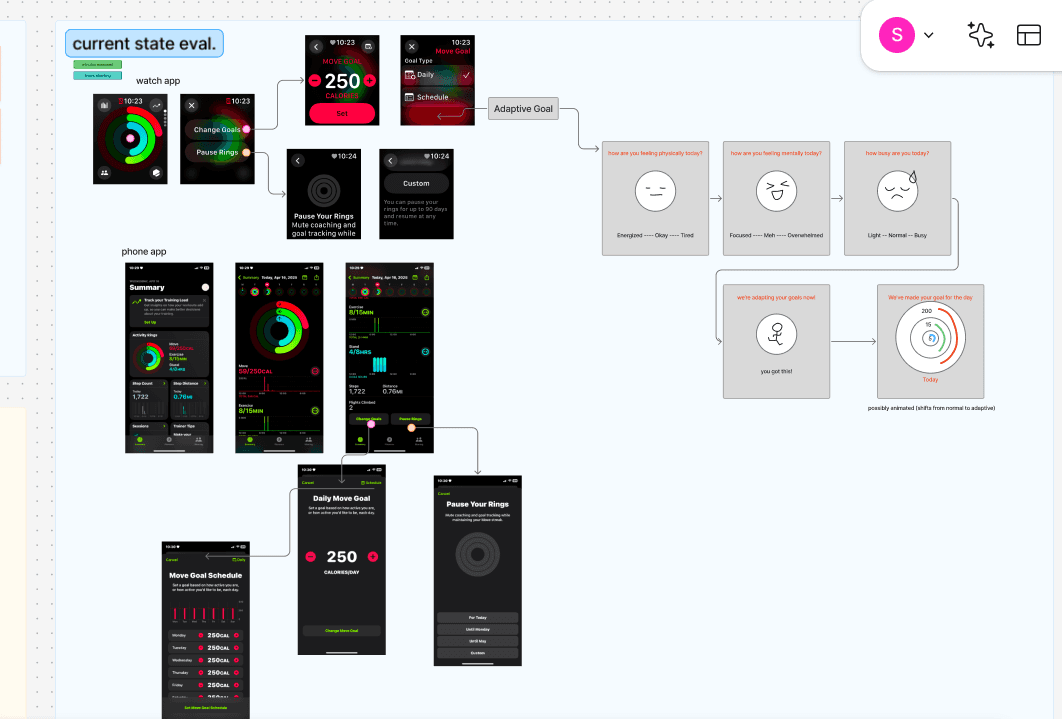
Evaluating the Current State 🔍
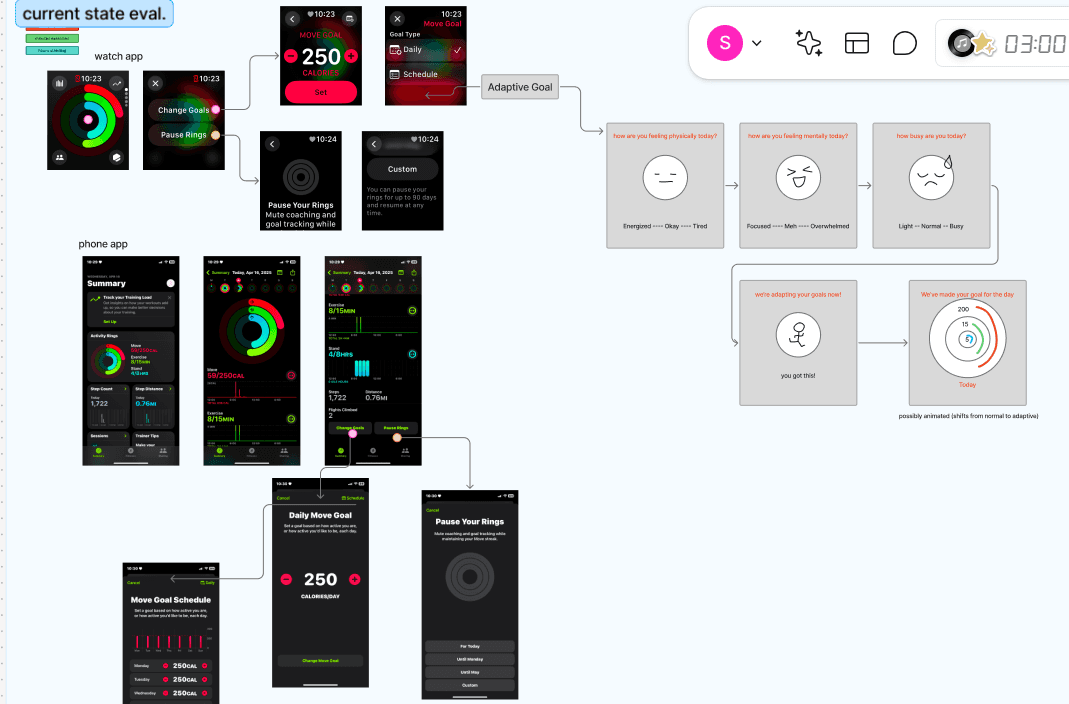
We started by analyzing the Apple Watch experience to see where our Adaptive Goals feature could fit naturally. This helped identify gaps and opportunities to improve user experience without disrupting familiar workflows.
What We Learned About the Current System 🧐
Users can adjust activity goals manually, but it’s static and requires effort
No support for fluctuations in energy, mood, or daily schedules
“Pause Your Rings” exists but doesn’t integrate with goal-setting for nuanced needs
No middle ground for stressed, tired, or overwhelmed users who still want activity
The system doesn’t ask about the user’s current state or adapt based on context
Trend graphs and scheduling exist in the phone app, but there’s no emotional or mental check-in
How Our Solution Fits 🛠️
Adds adaptive, context-aware goals that adjust to energy, mood, and schedule
Complements existing Apple Watch flows without disrupting familiar interactions
Provides a middle ground for users who want flexibility but still aim to stay active
Low-Fidelity Prototype📝
we created a simple daily check-in prototype. Users answer three quick questions about:
Physical readiness 💪
Mental focus 🧠
Schedule constraints 📅
Responses feed into the Adaptive Goals feature, dynamically adjusting activity rings based on how the user feels that day.
The check-in is designed to feel natural, minimal, and user-centered, providing a moment of reflection without feeling like an extra task.
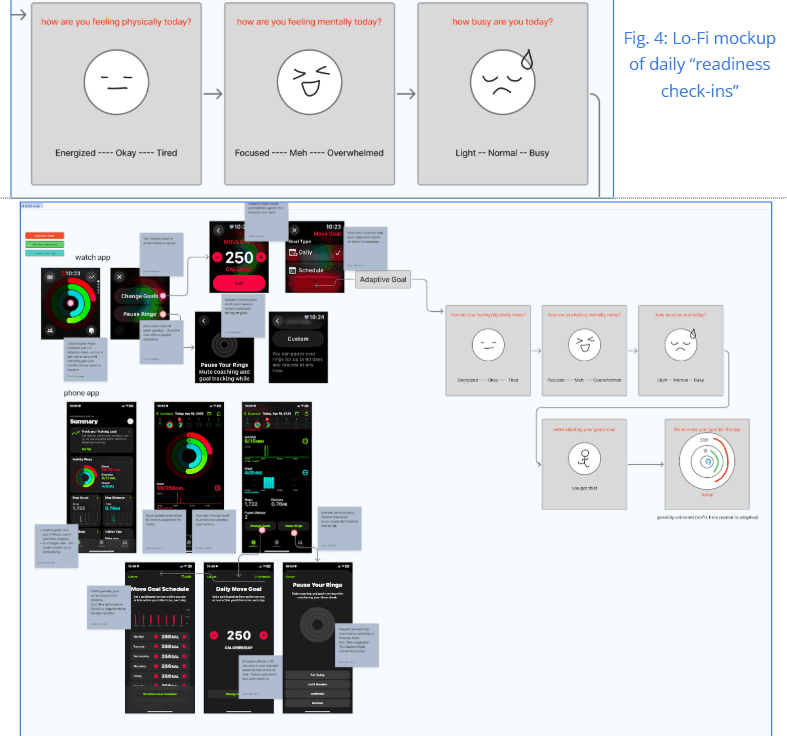
Mid-Fidelity Prototype 🎨
We refined the concept through mid-fidelity mockups to integrate seamlessly into the Apple Watch ecosystem. Key focuses included:
Preserving Apple’s clean aesthetic
Choosing colors, language, and flow carefully to reduce friction
Making the feature feel like it had always been part of the Apple Fitness experience
Adaptive Goals Flow ⚡
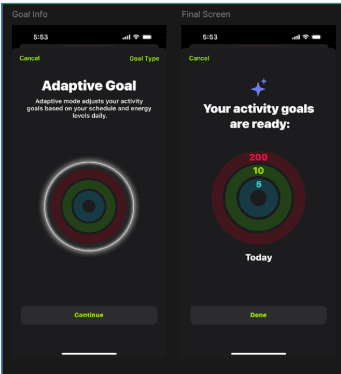
The final concept adds an “Adaptive Goal” option within the goal-change flow. Users see a quick overview of how it works, then complete a brief questionnaire to tailor their activity rings for the day.
Our Solution✨
Our final concept introduces an “Adaptive Goal” option as part of the existing goal change flow. After selecting this option, the user is presented with a quick overview of how Adaptive Goals work, followed by a brief questionnaire:
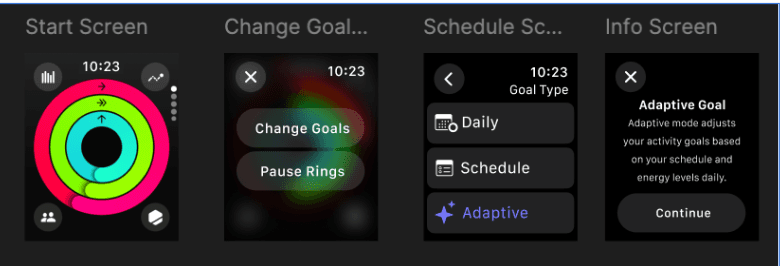
Daily Check-In 📝
Users answer three quick questions each day:
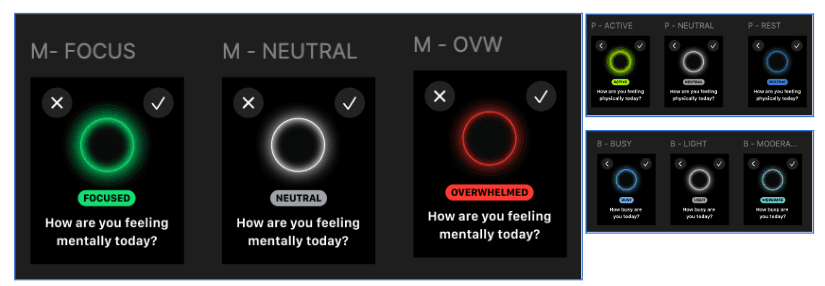
Mental state: Focused, Neutral, Overwhelmed 🧠
Physical state: Active, Neutral, Resting 💪
Busyness: Busy, Moderate, Light 📅
In the mid-fi designs, we replaced emojis with simple circular buttons to align with Apple’s brand style.
Adaptive Goals in Action ⚡
Based on check-in responses, the app adjusts Move, Exercise, and Stand goals for the day.
Over time, the system learns from behavior. For example: if a user frequently feels overwhelmed and struggles with goals, future targets are reduced proactively.
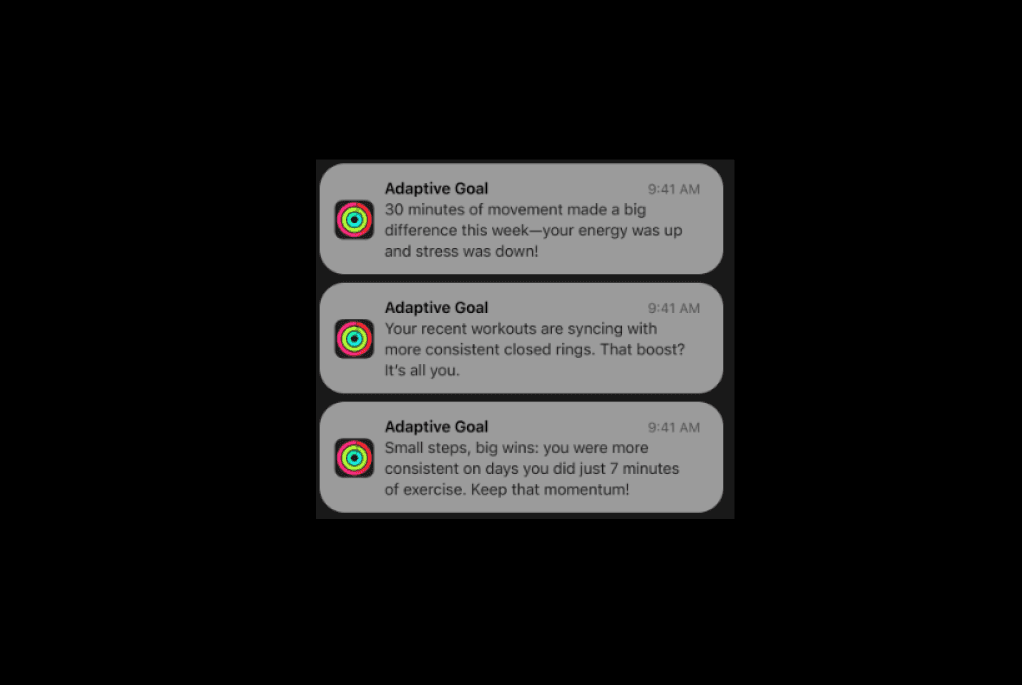
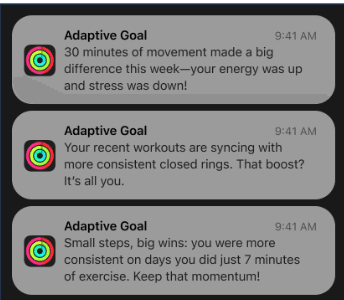
Supportive progress reports reinforce effort, celebrating small wins even on low-energy days.
How It Works Behind the Scenes 🤖
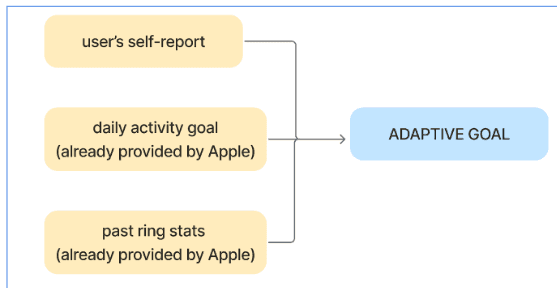
The adaptive system relies on machine learning using three main data sources:
Self-reported wellness from the daily check-in
Existing Apple Watch daily Move goal
Historical activity patterns
The algorithm evaluates these inputs to set realistic, meaningful goals, meeting users where they are, not where a standard model expects them to be.
Looking Ahead 🔮
With just three weeks to complete the project, several areas remain for future exploration:
Test Adaptive Goals with real users to measure motivation and consistency
Offer optional presets to reduce the need for daily check-ins
Explore ways to maintain long-term engagement with minimal friction
Evaluate feasibility and value with stakeholders
Refine visual design to better match Apple’s style
Final Feedback & Improvement 💡
Key questions from feedback:
Machine Learning Limitations: Can it truly personalize daily goals based on one-off emotional inputs?
Notifications & Motivation: Could prompts unintentionally reduce motivation?
Ethical Concerns: Could adaptive logic reinforce negative patterns by lowering goals on low-energy days?
Feature Overlap: How does this differ from manual goal adjustments?
These insights highlighted the importance of ethical design, transparency, and clear user benefit.
Team Contributions 🤝
Ani Berry: Research, interviews, initial prototypes, walkthrough video, ideation support with ChatGPT
Emily Clark: Desk/secondary research, problem framing, team coordination, documentation
Sarah Neumann: UX interviews, current state evaluation, storytelling for slides, feedback summarization
Priscilla Tam: Activity diagrams, problem framing, user journey mapping, AI-assisted idea evaluation, slide content
Use of AI 🤖
We used ChatGPT and Claude for brainstorming, research synthesis, and language refinement. AI helped distill insights, reframe concepts, and clarify writing. All academic citations and research were verified manually, AI was a support tool, not a source of truth.